Hi Laura -
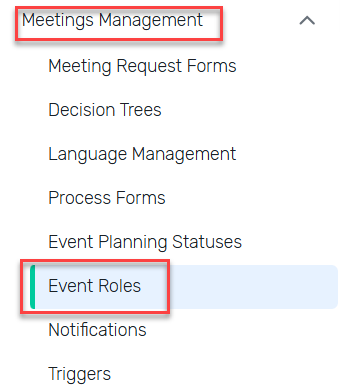
If you go into Admin and go to the Event Role that you assigned them, click on Edit to see all the hidden toggle options:
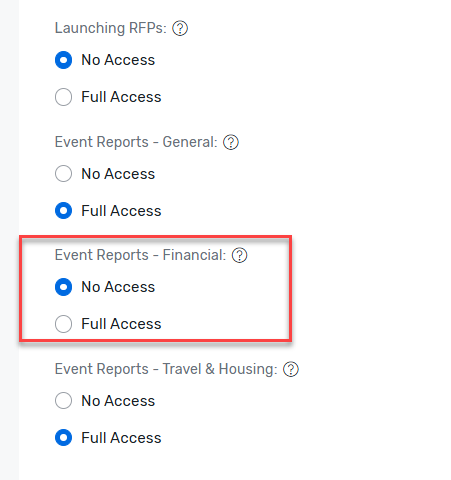
If you then scroll towards the bottom to Event Roles - Financial and toggle that to No Access, that should prevent them from running any reports with Invoice data.
Also, here's an article that outlines more info around Invoices, in case you need it: https://support.cvent.com/s/communityarticle/Managing-Your-Invoices
If that still doesn't do what you need it to do, I would recommend reaching out to Cvent Support for additional assistance.
Thanks,
------------------------------
Rebecca Yousif
Senior Administrator - Event Technology
------------------------------
Original Message:
Sent: 09-17-2025 10:28
From: Laura von Behr
Subject: How can we restrict a backend user to only see assigned events and guests?
Hi James and Rebecca,
Thanks a lot for your support! It was a great help.
However, the restricted user can still see the 'Invoices' tab in the admin settings. I haven't given them permission to see it and I couldn't find the settings for this tab anywhere.
Do you have any recommendations on how to remove the 'Invoices' tab from the restricted user's admin settings page?
------------------------------
Laura von Behr
Guest Relations Manager
Face To Face Event GmbH Germany
------------------------------
Original Message:
Sent: 09-16-2025 09:55
From: James Rose
Subject: How can we restrict a backend user to only see assigned events and guests?
Hello Laura,
We restrict our Cvent Account Users in two ways. First, by a specific User Role like Administrators, Repot Users, and we have two Event Planners types roles, one for Development/Advancement group, and the rest of the University.
With the roles you can choose specific admin, event, OnArrival, or any other module you have for your instance functionality and limited access.
Our second way to limit visibility is we create User Groups. This limits which event(s) each group has access too and the data related to specific event(s). Assigning an user with their user roles to a user group restricts visibility when the user logs in.
We currently have 60 user groups and a total of 150 account users on one of our instances of Cvent.
My suggestion when setting up a new user start off will the least amount of access as possible and add access as needed. People with too much access will run a muck very quickly.
------------------------------
James Rose | Senior Web Developer and Platform/Product Manager
Digital Infrastructure
Office of University Development | University of Michigan