Thank you for the instructions. I will try them out.
Original Message:
Sent: 01-09-2026 10:50
From: Sanjog Rana
Subject: How to set up registration email to session registrants
Hello Ines,
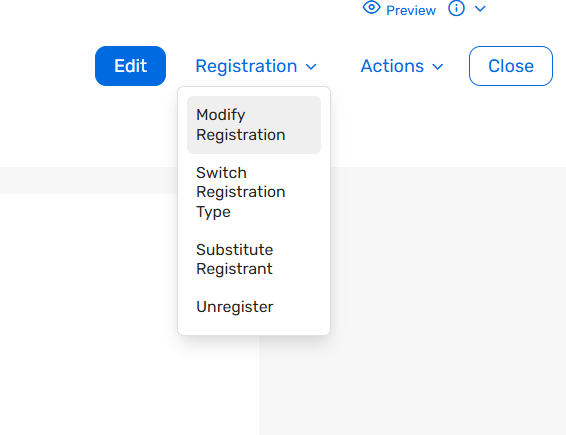
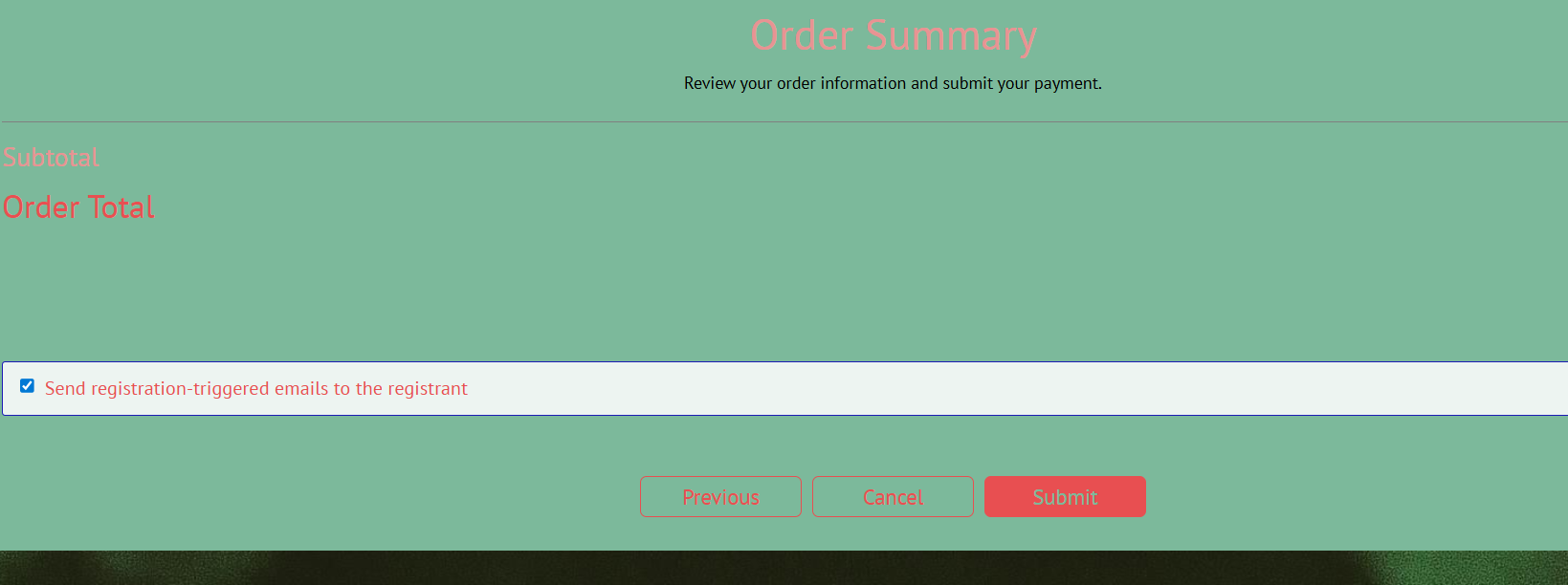
The option will appear when you go to the pending registrant record under Attendees > Attendee list > click on the registrants name > registration drop down at the top right> modify registration. When you reach to the last page of the registration process while performing the modify registration is when you see the check box send registration-triggered emails to registrants. Make sure you uncheck the setting before completing the registration.
I have attached screenshots for reference.
Please let me know if you face any issues. Thank you!
------------------------------
Sanjog Rana
Subject Matter Expert
Cvent Client Services
------------------------------
Original Message:
Sent: 01-09-2026 05:07
From: Ines Chen
Subject: How to set up registration email to session registrants
Hi Sanjog,
Would you please kindly show me where the option is as I can't find it? Thank you.
------------------------------
Ines Chen
Arm LimitedUnited Kingdom
Original Message:
Sent: 01-08-2026 09:10
From: Sanjog Rana
Subject: How to set up registration email to session registrants
Hello Ines,
Yes, there is an option on the final registration page to choose whether or not to send an email. It is checked by default-please make sure to uncheck it before completing the modification so no emails are triggered. I've attached a screenshot for reference.
Let me know if this works.
------------------------------
Sanjog Rana
Subject Matter Expert
Cvent Client Services
Original Message:
Sent: 01-07-2026 22:31
From: Ines Chen
Subject: How to set up registration email to session registrants
Hi Sanjog,
Thank you for providing the alternative solution. If I modify the invitee's registration record, it will not trigger another pending approval notification email to the registrant when I submit the form, correct?
------------------------------
Ines Chen
Arm LimitedUnited Kingdom
Original Message:
Sent: 01-07-2026 09:30
From: Sanjog Rana
Subject: How to set up registration email to session registrants
Hello Ines,
I agree-it could get confusing if multiple emails are triggered. The simplest approach would be as follows: once someone registers and their status moves to Pending Approval, they will receive the pending approval notification email (if enabled). You can also mention in the pending approval notification that the sessions selected during registration may or may not be approved.
Instead of approving the registration right away, we can go to the invitee record under the Attendee List, modify the registration by removing any sessions that are not allowed, and then submit and approve the registration. This will trigger the registration confirmation email with the final, correct details.
This way, we won't need to use session-specific emails. Let me know if this approach works. Thank you!
------------------------------
Sanjog Rana
Subject Matter Expert
Cvent Client Services
Original Message:
Sent: 01-06-2026 23:17
From: Ines Chen
Subject: How to set up registration email to session registrants
Hi Sanjog,
Thank you for your reply. Based on the solution you provided, if a registrant signs up for two sessions but is allowed to attend only one, I would first need to approve the registration, which means the registrant would receive a successful registration email. Then, if I unregister one of the sessions, the registrant would receive an unregistration email. Is my understanding correct?
If so, wouldn't this be confusing for the registrant, since they would first receive a successful registration confirmation and then an unregistration email?
I'd appreciate it if you could clarify this for me.
------------------------------
Ines Chen
Arm LimitedUnited Kingdom
Original Message:
Sent: 01-06-2026 10:10
From: Sanjog Rana
Subject: How to set up registration email to session registrants
Hello Ines,
We have an option under Session Emails that allows us to send automated emails when someone registers for or unregisters from a session. I've attached a screenshot showing where this can be configured while creating session emails.
When registrations are approved, a session email is triggered confirming that the user has registered for the session if we create a session register email. Similarly, when a session is unregistered or no longer allowed, the system prompts us to trigger a session email and we can check the box and send the email for session unregister. So, we will have to create 2 session emails one for session registration if required and one for session unregister.
Please let me know if this helps or if you need any clarification. Thank you!
------------------------------
Sanjog Rana
Subject Matter Expert
Cvent Client Services
Original Message:
Sent: 01-05-2026 21:43
From: Ines Chen
Subject: How to set up registration email to session registrants
Hi Sanjog,
Thank you for the answers. Regarding question 2, when unregistering attendees, are we able to set up automated emails to inform rejected attendees or to update them on their registration status (e.g., one session accepted and another rejected)? If so, could you please let me know how to set this up? Thank you.
------------------------------
Ines Chen
Arm LimitedUnited Kingdom
Original Message:
Sent: 01-05-2026 17:54
From: Sanjog Rana
Subject: How to set up registration email to session registrants
Hello Ines,
Answer 1:
Create the sessions as optional sessions within the session list. Then, add the Session Selection widget to the registration flow in the Site Designer. This will allow registrants to select one or multiple sessions during the registration process.
Answer 2:
Session-level approval is not available. However, this can be managed using the Update Session Registrants feature. First, approve the attendee's registration. Then, navigate to Attendee List, select the attendee, choose Bulk Actions > Update Session Registrants, and unregister the attendee from the sessions they should not attend.
Note: This approach works without any issues for free sessions.
Let me know if you need any further information. Thank you!
------------------------------
Sanjog Rana
Subject Matter Expert
Cvent Client Services