Open Forum

 View Only
  • 1.  Is there a Data Tag available for Session Locations? For use in Speaker Emails, and Speaker Resource Center?

    Posted 02-19-2025 14:38

    I'm wondering if there is an automated way to communicate to our speakers (in both a speaker email, and through the speaker resources center) the meeting room location of their session(s)? Even better, if we could add additional details specific to each meeting room (room setup, AV equipment, venue/floor)? Thanks!


    #MeetingsManagement

    ------------------------------
    Jennifer Moir
    Manager, Events
    Ontario Public School Boards AssociationCanada
    ------------------------------


  • 2.  RE: Is there a Data Tag available for Session Locations? For use in Speaker Emails, and Speaker Resource Center?

    Posted 02-20-2025 01:20

    Hi Jennifer,

    Yes, you can automate this process in Cvent. You can use session data tags in speaker emails to dynamically pull in meeting room details. Additionally, the Speaker Resource Center can be customized to display session-specific information, including room location, setup, and AV details.

    If the standard data tags don't cover everything you need, you can also create custom data tags to include additional details specific to each meeting room.

    Please contact me if you need any assistance on anything with your event in Cvent.


    ------------------------------
    Amarnath Annamalai
    Independent Cvent Consultant
    www.cvntexpert.com
    info@cvntexpert.com
    ------------------------------


  • 3.  RE: Is there a Data Tag available for Session Locations? For use in Speaker Emails, and Speaker Resource Center?

    Posted 8 days ago

    Hi there, 

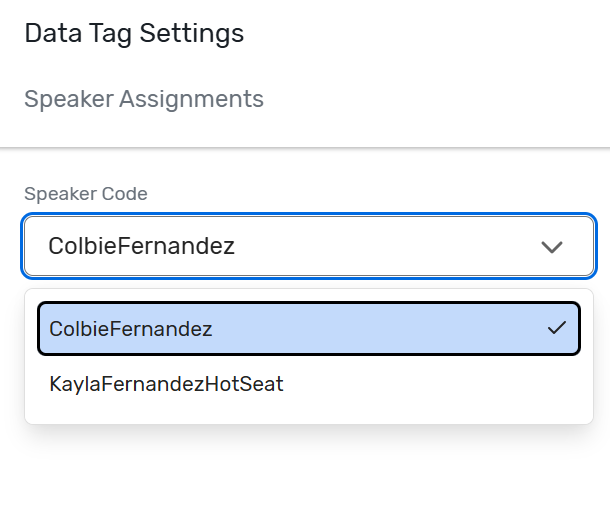
    I tried doing this and it is not tying together the sessions with the speakers. I have made sure to attach the speakers with each session. I tried using the speaker data tag  {[SP-SPEAKER ASSIGNMENTS:SPEAKERCODE]} but it makes me pick only 1 speaker's code to link their session information to. And custom data tags are not allowed in Speaker emails. Do you have a way we can include a data tag or have a different way we can send 1 email to all speakers and customize the email to include that speaker's session location, date, time, and title?


    ------------------------------
    Kayla McCray
    Events Specialist
    CP Franchising, LLCUnited States
    ------------------------------


  • 4.  RE: Is there a Data Tag available for Session Locations? For use in Speaker Emails, and Speaker Resource Center?

    Posted yesterday

    Hi Kayla, I recently put a ticket in for this with cvent, and they confirmed that unfortunately the program does not work like this just yet. Hopefully their product team will work on this to make sending speaker emails easier and more efficient. 


    ------------------------------
    Jennifer Moir
    Manager, Events
    Ontario Public School Boards AssociationCanada
    ------------------------------


  • 5.  RE: Is there a Data Tag available for Session Locations? For use in Speaker Emails, and Speaker Resource Center?

    Posted an hour ago

    Hi Jennifer,

    Hope you are well!

    I checked about it too and unfortunately, currently the option to add session location data tag within speaker email is not available. 

    However, I may have an alternative for you (though it may be a bit of work). 

    You can create a separate invitation list for 'Speakers' and import the speakers as invitees within the list (Do not register them for the event). While importing, you'll get the option to add the speakers within a contact group. You can create a new contact group for speakers to add all of them within it. Then, create internal information questions for assigned sessions and session location and import the responses of these internal information question for the speakers in the event. Once this is done, go to the Event Emails and select the Speaker Invitation list from the list drop down and create an email and add the internal information data tags in the email. After the email is created, you can go to Send > manually > Select the contact group that you created and select all the speakers and send them the email with the information. 

    I am adding a few articles below for your reference :

    Importing Event Contacts : LINK : : https://support.cvent.com/s/communityarticle/Importing-Event-Contacts

    Adding Invitation Lists : LINK : : https://support.cvent.com/s/communityarticle/Adding-Invitation-Lists

    Creating Internal Information Questions : LINK : : https://support.cvent.com/s/communityarticle/Creating-Internal-Information-Questions

    Importing Internal Information Answers : LINK : : https://support.cvent.com/s/communityarticle/Importing-Internal-Information-Answers

    Adding Question Responses to Emails : LINK : : https://support.cvent.com/s/communityarticle/Adding-Question-Responses-to-Emails

    I understand your perspective and apologize for any inconvenience. But, it sounds like a great feedback. I suggest you to post this as an Idea/feedback for our product team by going to Cvent Community > Participate > Product Ideas.

    We encourage you to always submit your ideas or any challenges you face while working with the product. As it also help our Product Development team to review the possibilities and if it works we may try to incorporate such changes in our future releases. 

    I hope this helps. Please let us know if you have any further questions.


    ------------------------------
    Raashi Semwal Khati
    Senior Quality Analyst
    Cvent
    ------------------------------