Hi Amanda,
If you are still having this issue, I would try some of the options below:
- copy the Summary link from Marketing > Weblinks and test it again in a fresh/incognito browser window
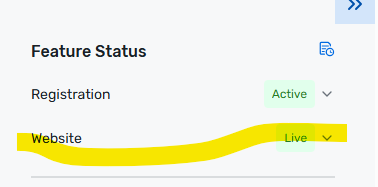
- If the Website feature is already Live and you still see an issue, delete the existing Summary weblink under Marketing > Weblinks, create a new one, and retest.
Hope this helps!
Julianna
------------------------------
Julianna Hampshire
Lead Customer Success Advisor
SalesforceGenericAccountUnited States
------------------------------
Original Message:
Sent: 03-03-2026 17:29
From: Amanda Tollberg
Subject: Weblink for summary not working
Hi Julia,
I am having this same issue. My Website is Live, as is my registration. But my Event Home Page/Summary link leads me to a page that says "Hmm...we don't have record of that event" Please help!!
------------------------------
Amanda Tollberg
Manager, Events & Development
Colorado PreservationUnited States
------------------------------
Original Message:
Sent: 08-20-2025 10:48
From: Julia Plymack
Subject: Weblink for summary not working
Hi Alexandra,
To confirm, does your website feature also say "live" next to it within the feature status section? This is a separate action than publishing your website within the site designer. The website will also need to be live in order for the summary weblink to work.
------------------------------
Julia Plymack
Senior Customer Success Manager
Cvent