What’s changing in the new navigation?
At a glance, you’ll notice three big shifts the moment you opt in:
1. Left-bar global navigation
We’re moving from the current top navigation to a left bar-based global nav that stays with you as you work.
2. A simplified way to move across Cvent
The old app switcher is going away. Instead, we’ve woven those destinations directly into the main navigation, so you don’t have to think about “which app” you’re in — just the task you’re trying to complete.
-
A clearer, more intuitive hierarchy that reflects how you actually plan, source, and measure events.
3. Faster access to your work
Several focused improvements make it easier to get into your day:
-
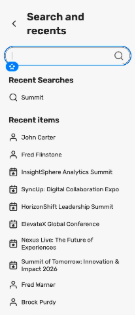
Search + Recent Items, combined
One entry point lets you quickly search or jump back into recently accessed events, RFPs, reports, and more — without hunting through separate menus.
-
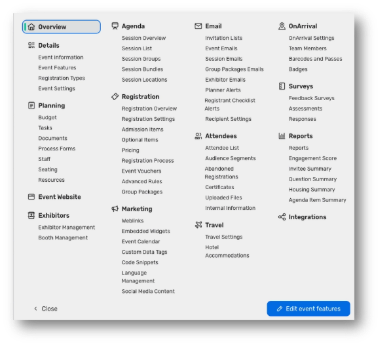
Click view all items to see everything in the event in one place
At the event level, a refreshed menu helps you jump directly into key areas (like registration, emails, venues, and more) from anywhere in the event workspace.
-
-
An Events section that consolidates event-centric experiences such as Events, Webinar, Essentials, Meeting Requests, Events+, and related views into one place.
-
-
Sourcing is renamed to Suppliers, with RFPs, reports, and supplier management tools grouped together.
For CSN suppliers, you’ll see a similar modernization on the RFP side of the platform, with a left bar nav and streamlined modules for RFPs, Intelligence, Prospecting, Venue Management, and more.
Why we’re changing navigation now
Navigation is where every workflow begins. In usability studies and feedback, we consistently heard that the current navigation:
The new navigation is designed to:
-
Free up screen space and modernize the feel
By simplifying header elements and pushing navigation to the side, we’re giving you more room to build pages, compare responses, and work in complex views — while also introducing a cleaner, more contemporary look.
-
Create consistency across the platform
Whether you’re building an event, managing RFPs, or reviewing program level insights, the navigation will look and behave the same — which means less time reorienting every time you switch context.
When the new navigation is rolling out
We’re deliberately rolling out the new navigation in phases, so you have time to explore, adapt, and bring your teams along.
For the core planner experience (not including supplier-side):
For CSN suppliers, a similar phased approach follows shortly after, aligning supplier-side navigation with the broader platform update.
What stays the same
While the navigation is changing, the core capabilities you rely on are not going away.
-
You’ll still be able to create and manage events, build websites, configure registration, manage RFPs, and run reports just as you do today.
Think of this as getting a better, more efficient front door to the same powerful tools.
How to get ready
Here are a few simple steps you can take now:
The new navigation is about helping you and your teams spend less time finding things and more time creating exceptional events and experiences. When you see the banner in your account, we encourage you to turn it on, explore, and start benefiting from a faster, cleaner Cvent experience.