Hello Amanda,
Thanks for reaching out! The text color for the Message field in the Contact Us form is controlled within the Contact Us modal, not the main widget styling.
To update it, please follow these steps:
-
Go to Website > Open Site Designer.
-
Click on the Contact Us button.
-
Select Customize.
-
Navigate to Contact Us Modal > Fields.
-
Update the Text Color for the Fields to black (or your desired color).
-
Publish the site to apply the changes.
Once updated here, the new color should display correctly for attendees.
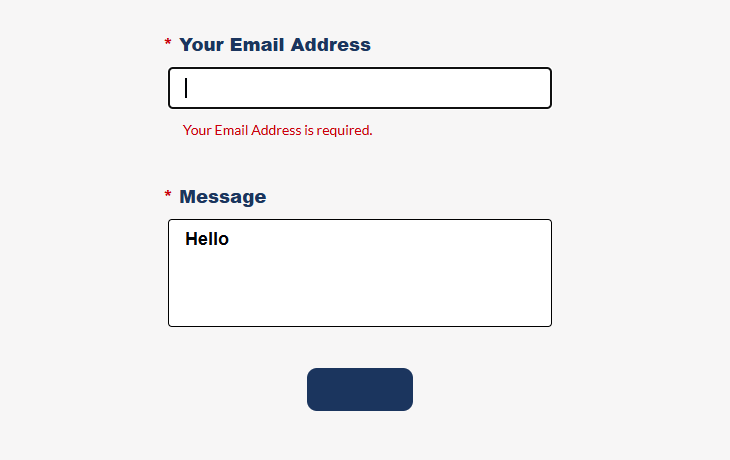
When I check the event the message is working fine but the button looks off as the text color and the background color is same. SS for reference. Just change the button text color under the contact us modal and we should be good to go.
Please let me know if you run into any issues or have additional questions-I'm happy to help!
------------------------------
Sanjog Rana
Subject Matter Expert
Cvent Client Services
------------------------------
Original Message:
Sent: 01-14-2026 12:55
From: Amanda Hoyt
Subject: "Contact Us" Message Field - Changing Font Color (Event No. QMNSY79DZNH)
I have tried to change the text color from white to black in the Message field within Contact Us and have been unsuccessful doing so. I tried the following and this did not work:
Steps to Change the Font Color:
- Access Site Designer: From your event's left-hand navigation, click Website, then Open Site Designer.
- Select the Widget: Click on the Contact Us widget on the canvas to open its configuration options in the right-hand panel.
- Customize Styling: In the panel on the right, under the Styling Options section, click Customize.
- Edit Text Color: Depending on the specific component, click on Text, Label, or Question Text. In the Text Color field, either enter a new HEX value or click the color box to select a color from your color picker.
- Save and Publish: Click Save to preserve the draft, or Publish to make it visible to attendees.
Important Notes:
- Overriding Global Styles: Once you make these individual widget updates, the Global Text Styling updates will no longer apply to this specific "Contact Us" widget.
- Pop-up Windows: If your "Contact Us" is in a pop-up, you can update its colors by going to Theme > Pop-Up Windows > Body in the site designer.
I welcome any help with this, please. Thank you.
#EventApp
------------------------------
Amanda Hoyt
Education Coordinator - Virginia Court Improvement Program (CIP)
Supreme Court of VirginiaUnited States
------------------------------