When hosting an event with multiple sessions and speakers, there are many ways you can encourage attendees to continue engaging with speakers even after the session time has ended, so that attendees can get their questions answered and feel more connected to the event content.
Leverage features of the Attendee Hub to continue the engagement with your attendees and speakers after their sessions are over. See below for 8 of our top suggestions!
-
- Use the Appointments tool: Give attendees the option to make 1:1 appointments with speakers after their session has ended to follow up on any outstanding questions or topics they would like to continue discussing.
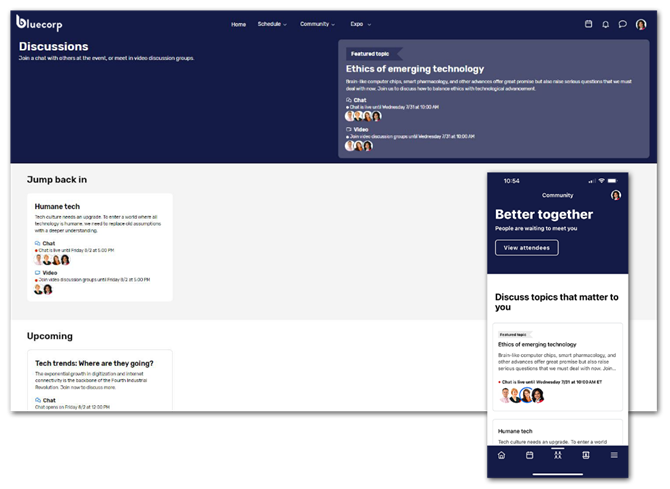
- Use the Discussions feature: Discussions allow attendees to meet with up to five other people at a time, either through a video meeting, or through chat. As a planner, you can set the topic, description, and can specify how long each conversation will last. You can have speakers host these Discussions on different topics they covered in their sessions, and attendees can join them to continue the conversation, or ask any follow-up questions they may have. You can assign the speakers as moderators, so they have control over the discussion. If there are certain groups you do not want to have access to the Discussions, you can limit the visibility of the Discussions feature to certain attendee groups as well.
- Repurpose Exhibitor Booths as “Speaker Booths”: Set up speakers as “exhibitors” and give them virtual booths where attendees can chat with them or send in questions, meet with them 1:1, and house their documentation and links to their websites/social media so they can stay in contact with them.
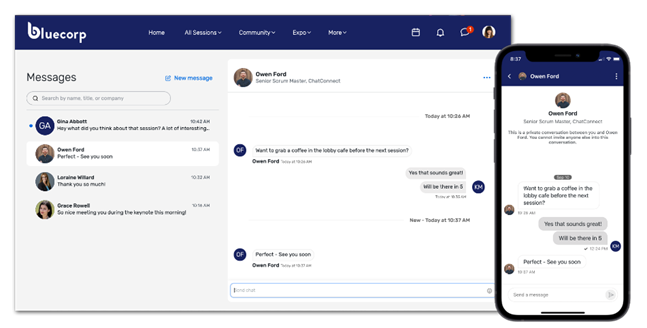
- Use the Attendee Messaging feature: Allow speakers and attendees to message each other directly through Attendee Messaging. Keep in mind, your speakers would also need to be registered as attendees for them to access this feature.
- Host follow-up Virtual Sessions: Consider hosting a follow-up panel on popular topics a few weeks after the event to bring the content back around and give attendees another opportunity to engage with the speakers. This can also be done at the end of the event to serve as a recap and a deeper dive into the topics discussed.
- Use Feedback Surveys: Include a section in your post-event survey where attendees can submit questions for speakers. Collect these questions and have the speakers respond in a follow-up communication.
- Create Video Responses: Ask speakers to record short video responses to the most common or interesting questions. These videos can be shared with attendees via email or posted on the Attendee Hub as post-event content.
- Add Dedicated Q&A Sessions to the agenda: Include dedicated Q&A sessions in your event schedule, either at the end of each day or as a special session after the event concludes. This allows attendees to ask questions they didn't get to during the main sessions.
By implementing one or more of these strategies, you can create multiple touchpoints for ongoing engagement between your attendees and speakers, enhancing the overall event experience and ensuring that attendees feel connected and valued.
#AttendeeHub#ManagingEvents#PromotingYourEvent#Blog