System Admins

 View Only
  • 1.  Auto Assigning User Group Visibility of Events

    Posted 04-09-2025 16:25

    Hi! I am struggling to determine how to make events created from a particular MRF automatically visible to a particular user group. Any suggestions?


    ------------------------------
    Samantha Smith
    Global Event Operations
    Ingram Micro Inc. United States
    ------------------------------


  • 2.  RE: Auto Assigning User Group Visibility of Events
    Best Answer

    Posted 04-09-2025 17:17

    Hi Samantha - 

    What you will want to do is create a Trigger based on Visibility and the User Group.  Here's where you would go to set that up:

    Admin ->Meetings Management -> Triggers - > hover over the drop down where you see Role and then select Visibility:

    Next, you'll want to select the Form and the Status that will trigger the action and select the User Group that you want to grant visibility to:
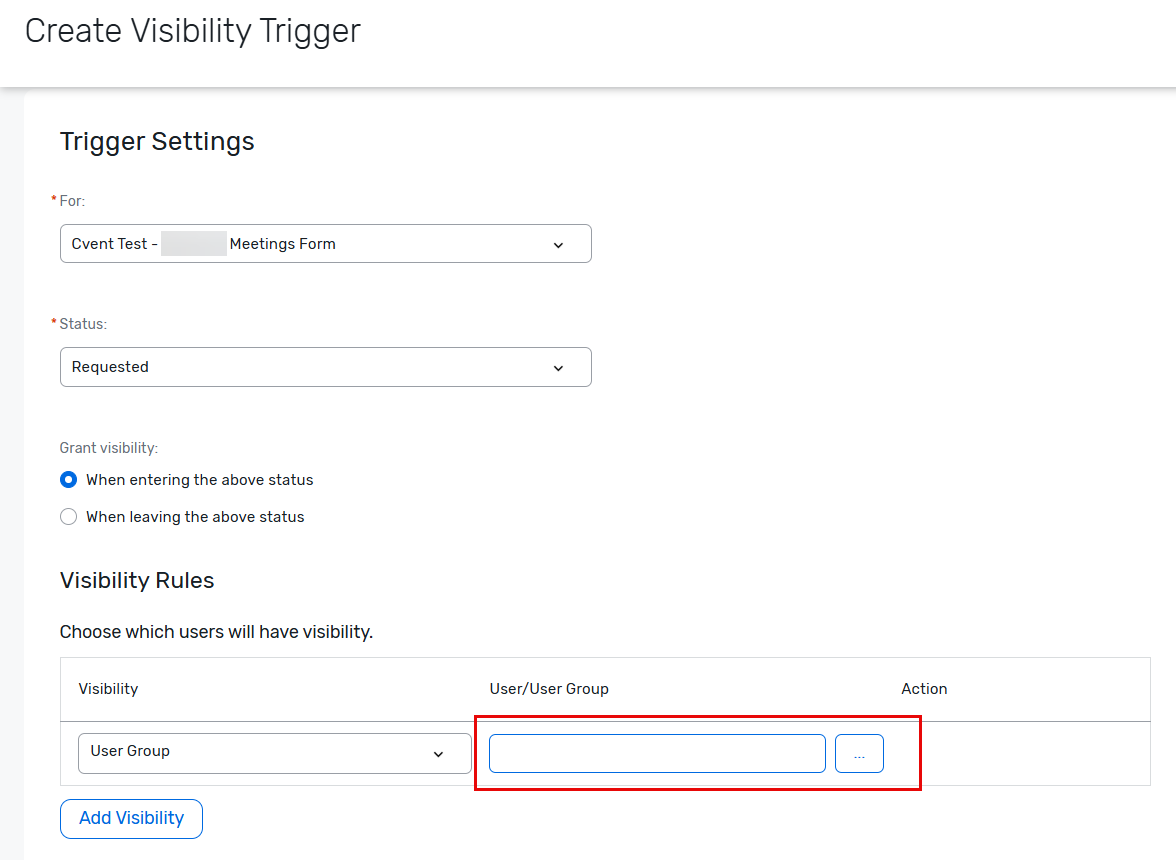
    Save your changes and test it out.  Hope this helps!


    ------------------------------
    Rebecca Yousif
    Event Technology Cvent Administration Senior Administrator
    ------------------------------


  • 3.  RE: Auto Assigning User Group Visibility of Events

    Posted 04-10-2025 10:19

    Thank you so much! I knew it was something easy that I was just missing.


    ------------------------------
    Samantha Smith
    Senior Manager, Global Event Operations
    Ingram Micro Inc.United States
    ------------------------------